
WhatsApp Business API CRM integration: how we wire it up
WhatsApp Business API CRM integration for online stores: webhooks, templates and the 24-hour window, so each chat sits on the customer record. Get a quote.
Muhammad Usman, Digital marketing lead · 12 November 2026 · 8 min read
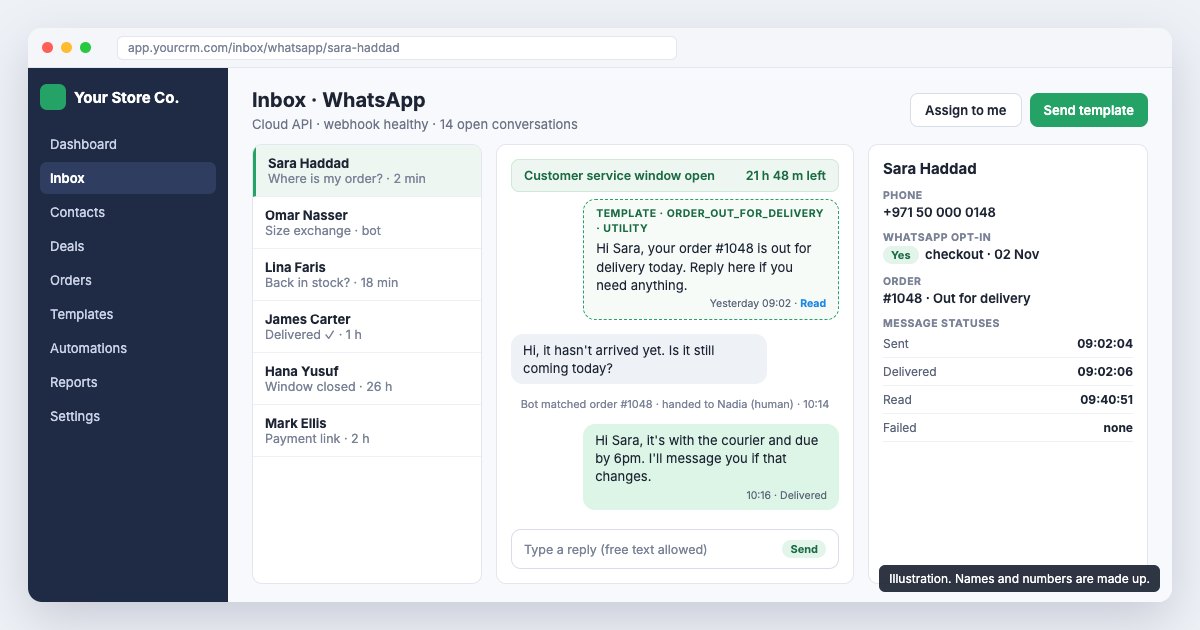
What this covers: the developer side of a WhatsApp Business API CRM integration for an online store. How messages reach the CRM, which records it needs, how the 24-hour window and message templates limit what it can send, and where opt-in, delivery statuses and n8n fit.
Most online stores start with WhatsApp on one phone. Orders come in through Shopify or WooCommerce, questions arrive on WhatsApp, and the CRM sees neither. Connecting the API to the CRM puts every chat on the customer record and lets an agent pick up where the bot stopped.
For the business case, setup steps and what the API costs to run, start with our WhatsApp Business API guide. This piece is about the build.
What does a WhatsApp CRM integration actually connect?
Three things: an inbound path, an outbound path and the state the CRM keeps between them. Inbound, Meta posts every customer message and every status change to a webhook you host. Outbound, the CRM calls the API to send a reply or an approved template. In between, the CRM has to remember who opted in, when each customer last wrote and what happened to every message it sent.
Sending a message is one API call. Knowing whether you are allowed to send it, and whether it arrived, is the real work.
WhatsApp Cloud API direct, or through a provider?
Both work. The choice decides who hosts the webhook and holds the token.
- Meta's Cloud API, direct. You set up an app in Meta's developer console, connect the number to your WhatsApp Business Account and point the webhook at your own endpoint. No provider margin on Meta's rates, every field Meta sends, and you own uptime and token security.
- A business solution provider such as Twilio or 360dialog, or an inbox platform such as Wati or respond.io. The provider hosts the connection and your CRM talks to their API. Quicker to start, with one more party between you and your data.
For a store that already runs a CRM, we usually connect direct and leave the provider layer out, unless the team also wants a shared inbox product. If you are weighing a platform, our comparisons of Wati and respond.io set out where each one fits.
How do WhatsApp API webhooks get messages into the CRM?
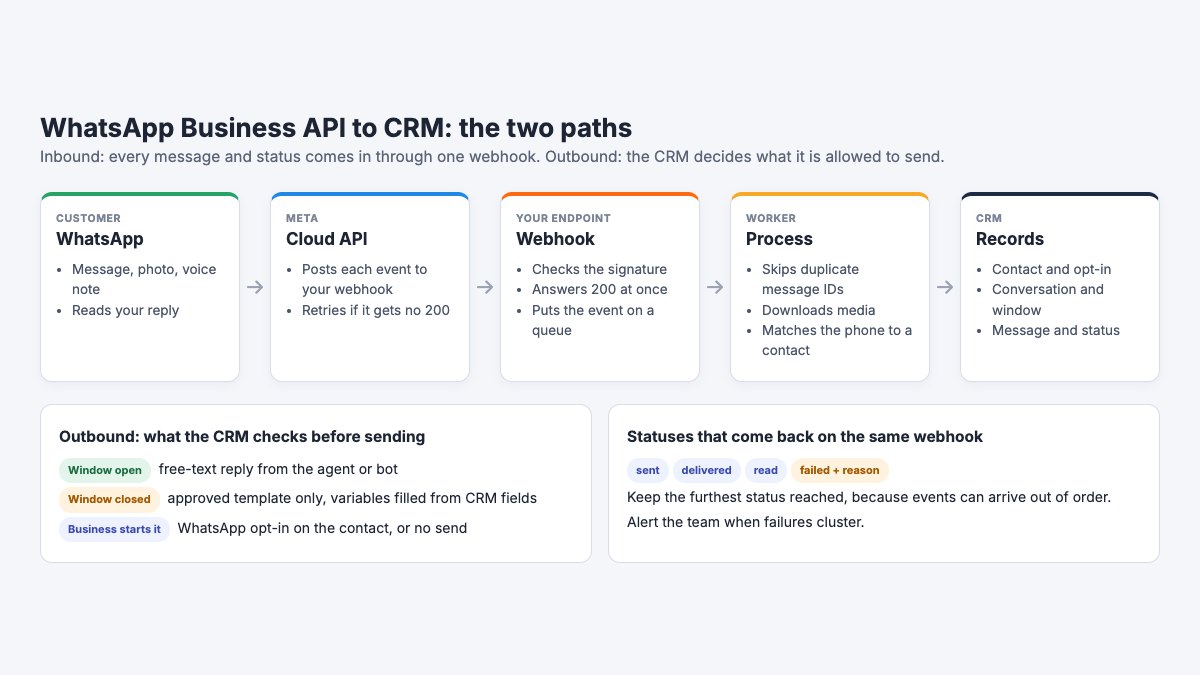
Through a webhook, built defensively. Meta sends a POST for every inbound message and status update. Our handler does five things:
- Verifies the endpoint. Meta confirms the URL once with a GET request carrying a verify token and a challenge, and the handler echoes the challenge back.
- Checks the signature. Every POST carries an
X-Hub-Signature-256header, a hash of the body signed with your app secret. Anything that does not match is dropped. - Answers 200 straight away. The work happens on a queue, so a slow CRM write never looks like a failed delivery.
- Ignores duplicates. Meta retries deliveries it thinks failed, so the same event can arrive twice. Every message has a unique ID, and the CRM stores it with a unique constraint.
- Fetches media promptly. A photo or voice note arrives as a media ID. The worker swaps it for a download link, which expires quickly, and copies the file into the CRM's own storage.
The worker then matches the sender to a contact. The webhook identifies the customer by phone number, so the CRM needs every number stored in one international format. A checkout that saved "050 123 4567" for some customers and "+971501234567" for others creates duplicates on day one, so we normalise numbers before go-live.
Which CRM records does a WhatsApp integration need?
Six, for an online store. Most CRMs already have the first.
| Record | Key fields | Why it matters |
|---|---|---|
| Contact | Phone in international format, name, WhatsApp opt-in with source and date | Ties every message to one customer and proves consent |
| Conversation | Contact, assigned agent, bot or human, time of last customer message | Drives the 24-hour window and the hand-off |
| Message | Message ID, direction, type, text or template name, time | One row per message; the ID stops duplicates |
| Status event | Message ID, status, error code, time | Shows what reached the customer and why something did not |
| Template | Name, language, category, approval state, variables mapped to CRM fields | Lets staff send approved templates without typing variables |
| Order link | Order number and status from Shopify or WooCommerce | Answers "where is my order?" without leaving the chat |
How does the WhatsApp 24-hour window change what the CRM can send?
It decides whether the agent can type freely or has to pick a template. When a customer messages the store, a customer service window opens for 24 hours from their latest message. Inside it, the store can send any reply. Once it closes, only an approved template can restart the conversation.
So the CRM works out when the window closes from the last inbound message and shows it on screen. While it is open, the reply box works as normal. Once it closes, the reply box becomes a template picker. We build this into the interface rather than leave it to the agent, because a free-text message sent outside the window is rejected and the customer never sees it.
Replies inside the window are free; templates are charged per message. Our clinic cost breakdown shows how the categories are priced.
How do WhatsApp message templates fit into the CRM?
Templates are the messages the store sends first: order confirmed, out for delivery, back in stock, basket reminder. Each one goes to Meta with a category (marketing, utility or authentication), a language and numbered variables, and it can only be sent once approved.
The CRM's job is to fill those variables from its own fields. "Your order {{1}} is out for delivery" takes the order number from the order record, never from an agent's keyboard. We keep a mapping between template variables and CRM fields, so renaming a field cannot break a template without anyone noticing.
Two things catch stores out. The first is category. An order update is utility, but add a discount code and it becomes marketing, charged at a higher rate, and Meta can recategorise a template it thinks is mislabelled. The second is rejection: vague variables or shortened links get templates turned down. We draft templates with the store and submit them early in the build, so approval is never the last thing holding up launch.
Want WhatsApp chats and order updates on your CRM records? Book a scoping call. Tell us which store platform and CRM you run, and we reply within one business day.
Where do opt-in and delivery statuses live?
Opt-in lives on the contact; statuses live on each message.
Meta requires a customer's permission before a business messages them first. We store it as its own field with the source and date, separate from email consent, and the template sender checks it before every send. Our Shopify customer journey article goes further into consent across channels.
Delivery statuses come back through the same webhook: sent, delivered, read and failed. They do not always arrive in order, so the CRM keeps the furthest status a message has reached rather than the last one received. Read receipts depend on the customer's settings, so "read" undercounts.
Failed is the status that needs a person. Each failure carries an error code: the number is not on WhatsApp, the window has closed, the template was paused, or Meta held back a marketing message. We turn the common codes into plain reasons on the message and alert the team when failures cluster, so a paused template gets fixed the same day.
Where does n8n fit, and where does it not?
n8n is good glue. It has WhatsApp nodes and a webhook trigger, so a small store can receive a message, look up the order and post the chat to the CRM without a custom service. It suits low volume and a handful of flows.
It fits less well as the main webhook at volume. Signature checks, duplicates and out-of-order statuses all become nodes, and a flow that fails halfway leaves the CRM half-updated. On larger builds we put a small service in front to receive, verify and queue every event, then use n8n for the business steps after it: tagging an order, notifying a channel, writing a field back to Shopify.
What have we built with the WhatsApp Business API?
For Klug Toys, a UAE and GCC online retailer of educational toys, we built WhatsApp API automation and a chatbot that handles customer support and order questions. For Lusso Lifestyle, a premium footwear brand with an online store and a Mumbai showroom, we automated order and customer-query handling over WhatsApp. The CRM wiring above is how we connect the same channel to your customer records.
"As a repeat client, I have been thoroughly impressed by their professionalism, attention to detail, and dedication to ensuring my satisfaction with every project."
Victor, Canada, via Freelancer, on a retail website with WooCommerce
How much does a WhatsApp Business API CRM integration cost?
It depends on the CRM, the flows and whether a bot answers first. Wiring click-to-WhatsApp and up to two other lead sources into one CRM pipeline is the Capture package at USD 950. WhatsApp AI qualification with a human hand-off is Qualify & Convert at USD 1,750. A full build with CRM implementation starts from USD 4,500. See pricing for what each includes.
Meta bills templates on top. Our WhatsApp Business API cost estimator gives a monthly figure for your volumes.
Ready to put WhatsApp on your CRM? Get a custom quote. Send us your store platform, your CRM and the messages you want automated, and we come back within one business day with a scope.
Where this fits
For the bot that answers before a person does, see WhatsApp and Instagram AI qualification. For turning store DMs into orders, read Instagram DM automation for ecommerce, and for accounting and back-office tools, system integration for CRM, accounting and back-office tools.