
GoHighLevel job dispatch: building a jobs module with custom objects
GoHighLevel job dispatch for home services: a Jobs custom object, technician steps and workflow triggers, so every won deal becomes a job. Book a call.
Muhammad Usman, Digital marketing lead · 16 November 2026 · 8 min read
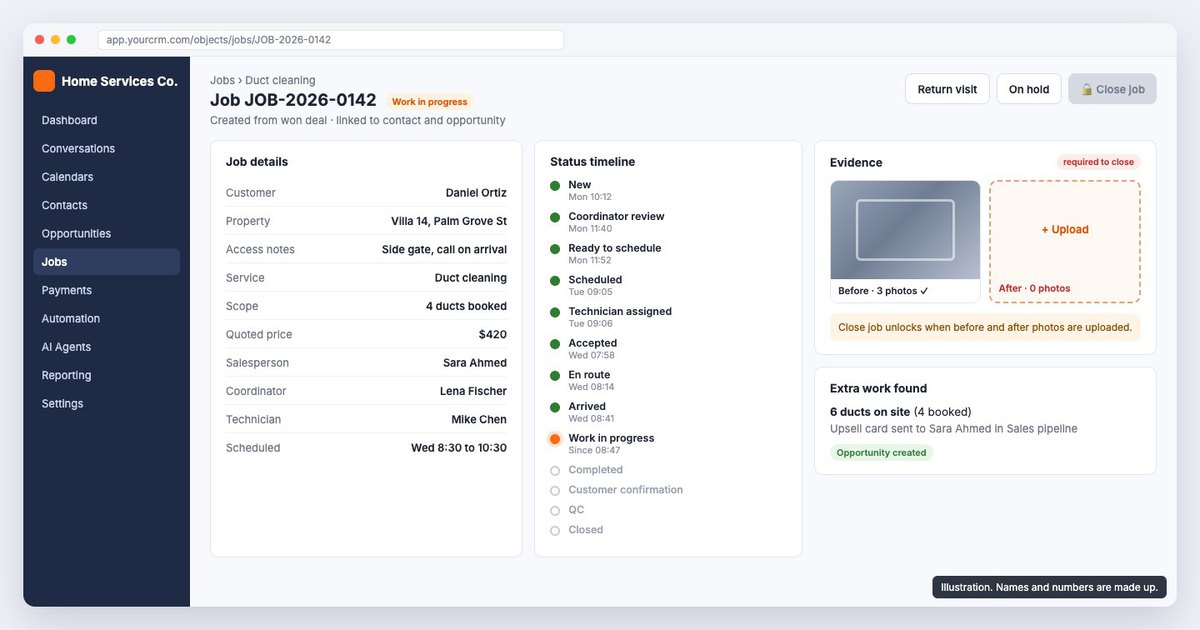
What this covers: GoHighLevel job dispatch for the moment a sale has to turn into a crew visit. We walk through a jobs module we scoped for a home services company: the job record, the statuses, the technician steps, the photo rule and the triggers that move a job along. GoDesign is independent and not a GoHighLevel partner.
A won deal is where most CRMs stop. Someone copies the address, scope and price into a WhatsApp group, and a technician turns up with half the story. The client asked us to close that gap.
This is the dispatch part of a larger build. For lead capture, the seven-stage sales pipeline and call handling, start with our step-by-step GoHighLevel CRM setup guide for home services companies.
Why put job dispatch inside GoHighLevel?
The client runs AC servicing and duct cleaning crews, plus maintenance, cleaning, pest control and annual maintenance contracts (AMC), in the US and the UAE. Sales sat in one CRM; job details sat in chat threads and personal phones. They were moving to GoHighLevel to stop per-user costs climbing, and asked whether technician dispatch could live there too.
It can, in two ways: a custom object called Jobs, or a second pipeline whose cards are jobs rather than deals. Either way, a coordinator who takes a call about tomorrow's visit sees the quote, the chat and the job on one screen.
The rule behind it is one of the client's own: no won deal without a job, and no job without a coordinator and a technician. If the CRM does not create the job, someone forgets to.
What happens the moment a deal is won?
The job is created automatically and carries everything sales already captured. Nobody re-types it. In our design, moving a deal to Won fires a workflow that creates the job and copies across:
- the customer and their contact details
- the property and service address
- the scope, for example how many ducts or which AC units
- the quote and the agreed price
- the salesperson
- the promised date
- inspection photos and notes
The job links back to the contact and the original deal, so the quote is one click from the job.
Which fields does a GoHighLevel job record need?
Fewer than people expect. This is what we specced for a basic module:
- Job ID, service line and status
- Customer, property address and access notes
- Scope, quoted price and salesperson, copied from the deal
- Coordinator and assigned technician
- Scheduled date and time window
- Before photos, after photos and technician notes
- Customer confirmation, with the time it was given
- Extra work found, as a yes/no plus a description
What statuses does a job move through?
The client's main path is long, but most steps are a tap, not typing:
New → Coordinator review → Ready to schedule → Scheduled → Technician assigned → Accepted → En route → Arrived → Work in progress → Completed → Customer confirmation → QC → Ready for invoice → Closed.
Four side statuses catch the jobs that do not go in a straight line: On hold, Return visit, Additional work and Material pending. Keep these as statuses, not tags. A tag is easy to forget to remove. A status holds one value at a time, so a list of "jobs waiting on material" is one you can trust.
How does technician dispatch work on the phone?
Seven steps on a phone: accept, start travel, arrived, start, pause, complete and customer confirmation. Each tap moves the job one status and stamps the time. The coordinator sees where every crew is without calling anyone.
Whether that happens in the GoHighLevel mobile app or a form link per job, we decide with the operations lead. A technician who finds the screen slow goes back to WhatsApp.
Why are before and after photos the rule that matters most?
Because "done" without evidence is the complaint you cannot answer. The client's rule is no completed job without evidence: before and after photos are required to close. We build it as a check in the workflow. If either photo field is empty when the technician taps complete, the job stays in Work in progress and the technician gets a prompt. QC then reviews the photos, not the technician's word.
What happens when the crew finds more work on site?
The job was booked for 4 ducts and the technician finds 6. That is a sale, not a note on the back of a form. The technician marks extra work found and adds photos. The job moves to Additional work, and a workflow opens a new card in the sales pipeline for the same customer, assigned to the original salesperson, with the photos attached.
Sales quotes the extra ducts within their discount authority, and the crew carries on once the customer agrees or closes on the original scope. The same flag works for wider finds: a technician who counts 8 AC units can point sales at AC servicing or an AMC.
Which GoHighLevel workflow triggers run the job flow?
This is the trigger map we proposed, alongside the sales pipeline triggers.
| ID | Trigger | Action | Auto or manual |
|---|---|---|---|
| J1 | Deal moved to Won | Create the job in New, copy the deal fields, link contact and deal, assign a coordinator | Auto |
| J2 | Coordinator checks the scope | Coordinator review → Ready to schedule, or back to sales if the scope is wrong | Manual |
| J3 | Date and time window set | → Scheduled; confirmation sent to the customer | Auto |
| J4 | Technician assigned | → Technician assigned; job sent to the technician's phone | Auto |
| J5 | Technician taps accept, start travel, arrived or start | Status moves and the time is stamped; customer told the crew is on the way at En route | Auto |
| J6 | Extra work found set to yes | → Additional work; upsell card opened for the salesperson with the photos | Auto |
| J7 | Technician taps complete | → Completed only if before and after photos exist; otherwise stays in Work in progress with a prompt | Auto |
| J8 | Customer confirms the work | → Customer confirmation; QC task created for the coordinator | Auto |
| J9 | QC passed | → Ready for invoice; finance notified | Manual |
| J10 | Invoice raised | → Closed; feedback request sent to the customer | Manual, then auto |
| J11 | Scheduled time passes with no Arrived tap | Alert the coordinator, then the manager | Auto |
J11 follows another of the client's principles: every overdue action has an escalation. After J10, a low feedback rating opens a customer-service follow-up and a good one triggers a Google review request.
GoHighLevel custom objects, a second pipeline or a field-service app?
- A second pipeline is the quickest to build. You get a board view, and the job stages use the same stage-change triggers as sales. It suits one job per deal and a short list of fields. The catch: a job card is still an opportunity, so sales reports have to filter jobs out, and repeat visits under one contract get awkward.
- A Jobs custom object gives the job its own record and fields, linked to the contact and the deal. It suits several jobs per customer, such as planned preventive maintenance (PPM) visits under an AMC. Before designing around it, check in your own account which workflow triggers and views custom objects get.
- An external field-service app makes sense when you need route planning, stock and parts, or offline working. GoHighLevel then stays the sales and customer system, and the job syncs out on Won and back on Closed.
For this client we proposed running GoHighLevel job dispatch inside the account to start with. Dispatch was one of ten areas in the build and budgeted at 5 to 6 hours. That budget is the scope signal: it buys a solid basic module, not a field-service product. One practical lesson from the first call: the client's login lacked admin rights, so Automations were hidden. Get admin access, including Automations, before anyone quotes.
What should a basic dispatch module leave out?
These are fair requests, but they belong in a later phase:
- route optimisation and live GPS tracking
- stock, parts and van inventory
- technician pay, commission and timesheets
- invoicing inside the job (the job hands off at Ready for invoice)
- offline mode
- multi-day scheduling for renovation and fit-out projects
Put them in the first build and the core flow (won deal, job, photos, closed) ships late and nobody uses it.
What does GoHighLevel job dispatch cost to set up?
CRM setups start from AED 2,900 (about USD 790). A build at this scope, with dispatch alongside lead capture, call handling and the inbox, is quoted as a fixed fee after discovery. In our plan it takes 4 to 5 weeks from access, and dispatch lands in week 4 once the sales pipeline and phones work. Platform usage such as phone minutes and WhatsApp conversations is billed by the platforms on top.
Want dispatch in your GoHighLevel account? Book a scoping call. Tell us how jobs reach your technicians today and where they get stuck, and we reply within one business day.
Where this fits
For the sales side that feeds this module, read our GoHighLevel home services CRM setup guide. If your business sells leads rather than services, see where GoHighLevel accounts leak leads. And if you are weighing a custom system instead, read CRM development for software companies.