
Custom CRM development: how we build one, layer by layer
Custom CRM development for agencies, studios and consultancies: data model, roles, pipeline and CRM integrations built around how you sell. Get a quote.
Muhammad Usman, Digital marketing lead · 14 November 2026 · 7 min read
What this covers: custom CRM development for a professional services firm, such as an agency, design studio or consultancy, whose work runs from enquiry to proposal to project. We go through the build layer by layer: data model, roles, the pipeline engine, the first integrations, web and mobile, and the stack.
If you are still deciding whether custom is right at all, start with our guide to custom CRM development, which covers when a build beats an off-the-shelf CRM. If you are a software company building a CRM to sell, read CRM development for software companies instead. This piece assumes the decision is made and shows what we build.
Where does a custom CRM build start?
With the data model, not the screens. Screens are cheap to change. A data model that cannot express how your firm sells is expensive to change once a year of records sits in it.
Discovery produces five things before any code is written: the list of records and how they relate, a roles matrix, the pipeline stages with their rules, the integrations in priority order, and a written list of what is out of scope. You see all five, with a fixed quote, before the build starts.
The most useful input is your mess. The spreadsheet where proposals are tracked, the inbox folder for won work, the notes column someone uses for everything. Those show what the CRM really has to hold.
What does a custom CRM data model look like?
For most services firms, eight records cover it. An organisation has contacts. An enquiry becomes a deal when it qualifies. A deal has proposal versions. A won deal becomes a project. Activities and an audit log attach to all of them.
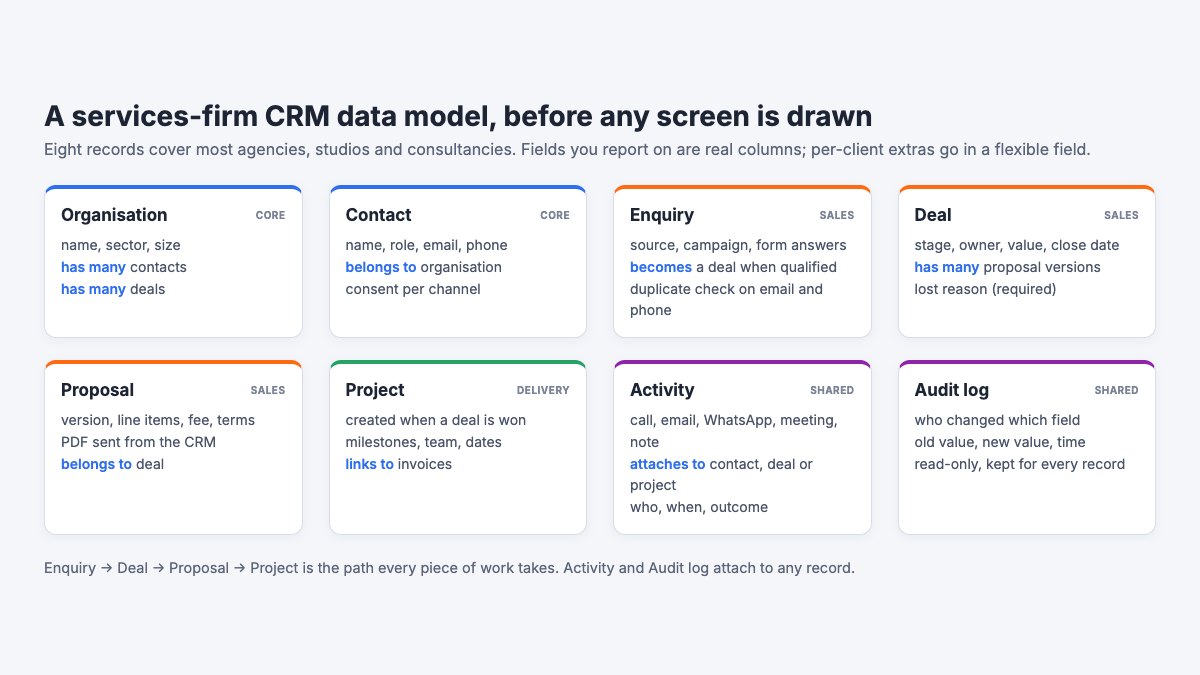
Three decisions shape everything after:
- Real columns for anything you report on. Fee, stage, source, owner and close date are proper fields with types. Per-client extras that nobody reports on go in one flexible field, so adding them never needs a developer.
- Proposals as versions, not overwrites. A studio often sends three versions before a yes. Keeping each one shows what changed between the first fee and the signed one.
- An audit log from the first migration. Who changed which field, from what, to what, and when. It is cheap to add at the start and painful to retrofit.
Duplicates are dealt with at the door. A new enquiry is checked against existing contacts by email and phone before a record is created, so the same client does not appear three times under three spellings.
How do CRM roles and permissions work?
We start from three tiers: admin, manager and staff. Staff work their own records, managers see their team and approve, admins configure everything. Most firms then need two refinements.
The first is record-level rules. An account manager sees their own clients, a department head sees the department, a partner sees everything. The second is field-level rules. Fees, margins and day rates are often hidden from junior staff even on records they can open.
We enforce both in the API and the database, not just by hiding buttons. A permission that only lives in the interface can be bypassed by anyone who knows the right URL.
How does the pipeline engine move deals?
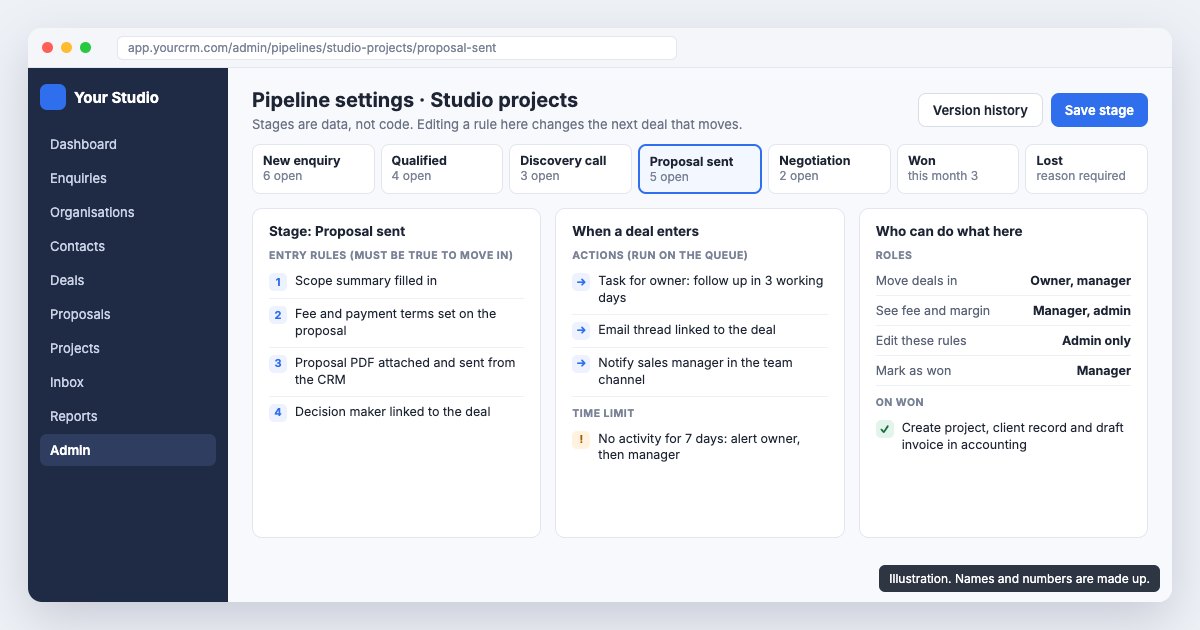
Stages are data, not code. An admin can rename a stage, add one or change its rules without a release.
Each stage carries three kinds of rule:
- Entry rules that must be true before a deal moves in. A deal cannot reach "Proposal sent" until the scope summary, fee and terms are filled in and the proposal has gone out from the CRM.
- Actions that run when a deal enters: a follow-up task for the owner, a note to the manager, the email thread linked to the deal.
- Time limits that escalate. No activity for a set number of days alerts the owner, then the manager.
Every stage change is recorded as an event and the actions run on a queue, so a slow email server never stops a deal moving. "Won" creates the project and hands over to delivery. "Lost" asks for a reason, because the lost-reason report is where pricing and positioning problems show up first.
Planning a CRM around how your firm actually sells? Book a scoping call. Send the spreadsheet or tool you use today, and we reply within one business day.
Which CRM integrations should go in first?
The ones that remove retyping. For a services firm that is usually email, WhatsApp and accounting, in that order.
- Email. Two-way sync with Google Workspace or Microsoft 365, so threads attach to the right contact and deal by address. Proposals go out from the CRM, so the record shows what was sent and when.
- WhatsApp. Enquiries and client chats land on the contact through the WhatsApp Business API. We set out the webhook, template and 24-hour-window side in WhatsApp Business API CRM integration.
- Accounting. A won deal creates the client and a draft invoice in your accounting software, and payment status comes back to the CRM. Our guide to system integration for CRM, accounting and back-office tools covers that hand-off.
Lead forms and ad platforms follow, through website and landing page capture. Every integration gets the same treatment: a queue, retries, a log you can read and an alert when it fails. One broken connection should never take the CRM down with it.
Web app, mobile, or both?
Web first. We build web applications that work on phones, tablets and desktops, so the partner on a site visit and the coordinator at a desk use the same CRM. For most services firms that covers everything they asked a mobile app for: check a client, log a call, move a deal.
A native app earns its place when staff work offline or rely heavily on the camera or location. If that is you, say so in the brief and we confirm on the call what we would take on.
Which stack should a custom CRM be built on?
The one your team can maintain after launch. For most custom CRMs that means Laravel or Node.js on the server, PostgreSQL or MySQL for the data, and React for the interface. If your developers already work in one of these, we build in it.
We have shipped Laravel web applications such as eFin by IntelliTax Trust, a tax and financial-management platform. On CRM work, we implemented Zoho CRM with a WhatsApp API chatbot for Easy Wedding, the flagship site in a multi-country wedding-planning network. Code lives in your repository and you own it, along with the data and the hosting account.
"Great and reliable collaboration — the work was completed professionally, cleanly, and exactly as agreed. I'm very satisfied with the result and can absolutely recommend working with him."
Jens, Germany, via Freelancer, on a search platform data collection tool
Where do custom CRM projects go wrong?
Mostly in the same four places, and each one is cheaper to prevent than to fix.
- Screens before the data model. A CRM designed from mock-ups looks right in the demo and then cannot hold a second proposal version or a deal with two contacts. We agree the records first.
- Permissions that live only in the interface. Hiding a fee column is not the same as protecting it. Rules go in the API and the database.
- Integrations with no queue. A direct call to email or accounting that fails silently leaves records half-written. Every connection gets retries, a log and an alert.
- Duplicates from day one. Imported spreadsheets and inbound forms create the same client twice unless matching runs at the door.
None of these is about the stack. They are decisions made in discovery, which is why discovery comes before the quote.
What does custom CRM development cost?
A custom CRM is quoted as a fixed fee after discovery, once the data model, roles, stages, integrations and out-of-scope list are agreed. Any number before that would be a guess.
If discovery shows a configured CRM would do the job, we say so. Our Full Journey package covers CRM implementation and routing for up to ten users from USD 4,500.
Ready to scope your CRM? Get a custom quote. Tell us how work reaches you today and what your team retypes most, and we come back within one business day with next steps.
Where this fits
For the build-or-buy decision, read the custom CRM development guide on our sister site. For our CRM work by sector, see the professional services industry page, and for assigning each enquiry to the right person, CRM routing and handoff.