
Custom CRM vs off-the-shelf: when building is worth it
Custom CRM vs off-the-shelf: when HubSpot or Zoho is enough, when a custom CRM pays for itself, and the hybrid route in between. Get a build-or-buy answer.
Muhammad Usman, Digital marketing lead · 18 November 2026 · 7 min read
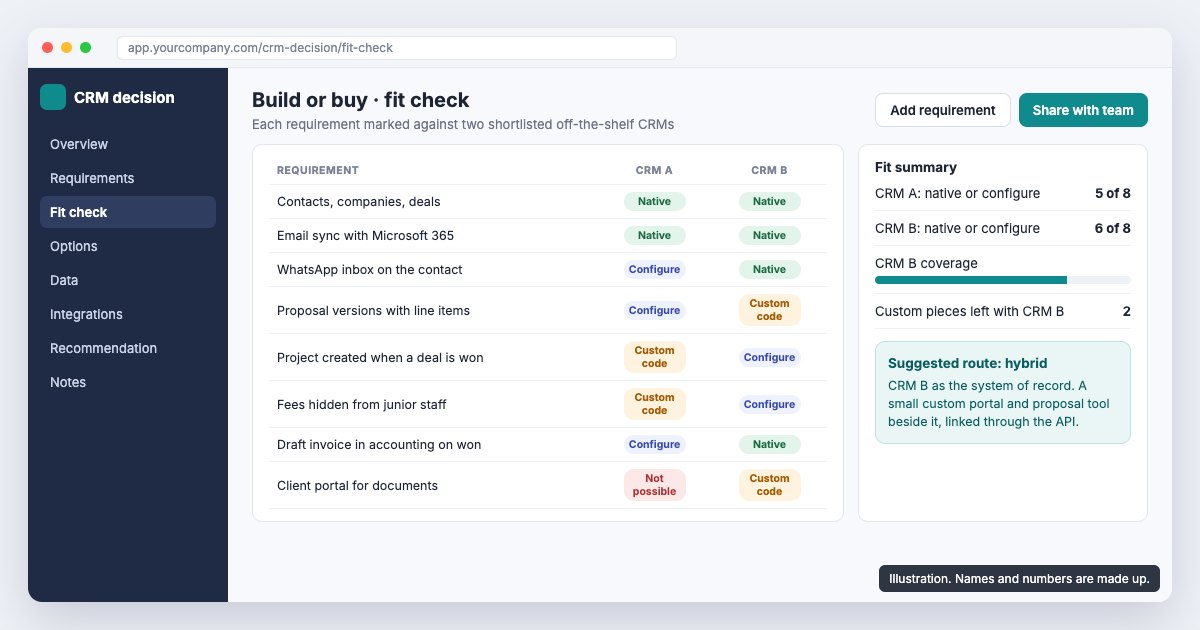
What this covers: custom CRM vs off-the-shelf CRMs such as HubSpot, Zoho or GoHighLevel, and how to decide between them, written for professional services firms. When buying is the right call, the signs that a build will pay for itself, and the hybrid route in between, which is where most of the firms we talk to end up.
We build custom CRMs and we implement off-the-shelf ones, so we have no reason to push either. The honest answer is usually "buy the core, build the gap". Getting there takes a clear look at which parts of your process a product handles well and which it never will.
What is the difference between a custom and an off-the-shelf CRM?
Who owns the roadmap. With an off-the-shelf CRM you rent a product and configure it. The vendor decides what it can do, hosts it, updates it and charges per user, every month. You can be live in weeks.
With a custom CRM you own software built around your process. You pay for the build up front, then for hosting and upkeep, and changes need a developer unless the build makes them configurable. In exchange, the CRM models your work exactly, and nobody can change the price or retire a feature under you.
Neither is better in general. One is better for your process, your headcount and your timeline.
When is an off-the-shelf CRM the right answer?
More often than custom developers like to admit. Buy when most of these are true:
- Your sales process is standard. Enquiry, qualified, proposal, won or lost. Every major CRM models that out of the box.
- The records you need are contacts, companies and deals. If nothing else has to live in the CRM, a product covers it.
- You need it running this quarter. A configured CRM goes live in weeks; a custom one takes longer, because it is being built.
- Your workflows fit a visual builder. If "when X happens, do Y" covers your rules, you do not need code.
Each product has a sweet spot. HubSpot is strong where marketing and sales share one record. Zoho covers a wide range of business apps under one roof. GoHighLevel suits agencies and local service firms that want calls, texts, WhatsApp and booking in one account. We cover where GoHighLevel accounts go wrong in GoHighLevel for lead generation businesses.
When does a custom CRM pay for itself?
When the CRM has to hold something the products do not model, and working around that costs more than building it. The signs we look for:
- Your core record is not a deal. A car dealer tracks vehicles and margin VAT. A care staffing agency matches shifts to staff with compliance checks. A venue juggles provisional holds, viewings and contracts. Forcing those into "deals" with custom fields works until reporting starts.
- Workarounds have piled up. Three tools, two spreadsheets and a chain of automations nobody fully understands, all to cover one process.
- Per-user pricing grows faster than value. Thirty people need to log a visit or check a status, but only five use the sales features you pay for.
- Data rules are strict. Where the data is hosted, which fields each role sees, and a full audit trail, all beyond what your plan offers.
- You want to sell it. A CRM you license to customers is a product. See CRM development for software companies.
If two or more are true, a custom build deserves a proper look. Our walkthrough of how we build a custom CRM shows what that involves, from the data model to the stack.
| Question | Points to off-the-shelf | Points to custom |
|---|---|---|
| What is your main record? | Contacts, companies and deals | Jobs, shifts, vehicles, licences or bookings |
| How many users, doing what? | A sales team using most features | Many users who each need a small slice |
| How soon must it run? | Weeks | You can wait for a scoped build |
| Who changes it later? | An admin in a settings screen | A developer, or settings the build exposes |
| What about data rules? | The vendor's hosting and permissions are enough | Hosting, field access or audit beyond the plan |
What are the risks of a custom CRM?
Mostly cost, time and ownership. You pay for the build before anyone uses it, and a scoped build takes longer to go live than a configured product. After launch, hosting, security updates and upkeep are yours to fund, where a vendor would carry them.
Changes are the other risk. On a product, an admin edits a stage in a settings screen. On a custom CRM, a change needs a developer unless the build exposes it as a setting. That is why we build stages, fields and rules that change often as admin settings, and keep the code in your repository so any team can maintain it.
None of this rules custom out. It means the gap a product cannot fill has to be worth more than the build and its upkeep.
What is the hybrid CRM route?
Buy the core and build only the gap. The off-the-shelf CRM stays the system of record for contacts, companies and deals. Custom work fills what it cannot do, in one of four places.
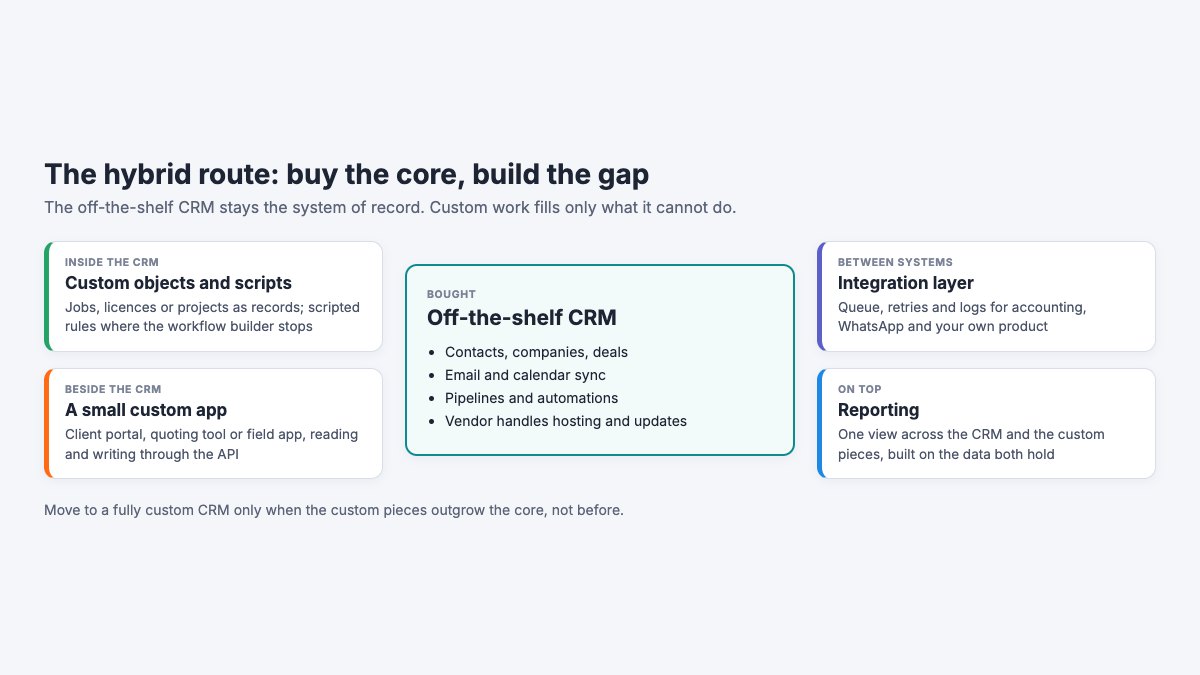
- Inside the CRM. Custom objects for records it does not model by default, and scripted rules where the workflow builder runs out. Our GoHighLevel job dispatch build is an example: a jobs module inside the CRM rather than a second system.
- Beside the CRM. A small custom app, such as a client portal, quoting tool or field app, that reads and writes through the CRM's API.
- Between systems. An integration layer with a queue, retries and logs, so accounting, WhatsApp and your own product stay in step. See WhatsApp Business API CRM integration for one example.
- On top. Reporting that reads from the CRM and the custom pieces, so nobody stitches spreadsheets together on a Friday.
The hybrid route keeps the vendor's hosting, updates and mobile apps, and limits custom code to the part that makes your firm different. Move to a fully custom CRM only when the custom pieces have outgrown the core.
Not sure which route fits your firm? Book a scoping call. Bring the tools you use today and the process that hurts most, and we reply within one business day.
Is a custom CRM cheaper than off-the-shelf over time?
It depends on headcount, so compare them over several years, not on day one.
- Off-the-shelf: a licence per user per month for as long as you use it, plus setup and any paid add-ons. Cheap to start, and the cost rises with headcount.
- Custom: a build fee up front, then hosting and maintenance. Expensive to start, flat as you hire.
- Hybrid: the licence, plus a smaller build for the gap.
Count the users who need access, the add-ons you would need, and the hours spent on workarounds today. That comparison usually settles the question before any vendor demo does. Our Full Journey package covers implementing an off-the-shelf CRM with routing for up to ten users from USD 4,500. Custom and hybrid builds are quoted as a fixed fee after discovery.
What happens to your CRM data if you switch later?
It moves, but only as cleanly as it was kept. Off-the-shelf CRMs export contacts and deals well, and activity history less well. With a custom CRM the database is yours, so nothing is locked in. Either way, plan the field mapping, de-duplication and test imports before the switch, not after. Our sister site's guide to CRM data migration covers that in detail.
How do we help you choose custom or off-the-shelf?
We map your process first, then mark each requirement as native, configurable, custom or impossible for the products you are considering. The answer usually falls out of that list. We implemented Zoho CRM, alongside a WhatsApp API chatbot, for Easy Wedding, the flagship site in a multi-country wedding-planning network. We also build custom CRMs and the integrations between systems. GoDesign has delivered 900+ projects since 2018.
"Working with Kaiser was a great experience. He was responsive, detail-oriented, and truly understood the vision. The final result is clean and modern. I would highly recommend them."
Majdeline, United States, via Freelancer, on a trade show landing page
Ready to settle build or buy? Get a custom quote. Send us your current tools, team size and the process you cannot fit into them, and we come back within one business day with a recommendation and next steps.
Where this fits
For the full build, read how we build a custom CRM. For moving records between systems, see the CRM data migration guide, and for wiring the CRM to accounting, system integration for CRM, accounting and back-office tools.